Auditing AI Workloads on AWS: Seven Questions an Account Scan Can Answer
Bedrock and SageMaker add new controls to an AWS account: invocation logs, guardrails, private endpoints, notebook settings. Seven questions an automated scan can answer, and what each answer leaves to verify by hand.
When a team starts using Amazon Bedrock or SageMaker, the AWS account gains a set of controls that general cloud security reviews were not built to look at: whether model invocations are logged, whether guardrails exist, whether notebooks can reach the internet, and who holds permission to call models at all. Each of these is a configuration setting that can be read through the AWS APIs, which makes them good candidates for an automated audit.
In April 2026 I added a dedicated AI audit to Kosty, the open-source AWS audit tool I maintain. Version 2.0.0 introduced a kosty ai command with 12 checks for Bedrock and 8 for SageMaker. Writing those checks made one distinction clear: a scan can establish that a control is configured, and it can find settings that are plainly unsafe, but most of the questions that matter still need a person to confirm what the configuration means in practice. This article sets out the seven questions I would ask of any AWS account running AI workloads, what an automated check can answer, and what it leaves open.
Seven questions, and the limit of each automated answer
| Question | What the v2.0.0 check reads | What remains to verify |
|---|---|---|
| 1. Is every model invocation recorded? | Whether Bedrock model invocation logging sends to S3 or CloudWatch in the region | What is logged, how long it is kept, and who can read logs that contain prompts |
| 2. Are guardrails in place? | Whether at least one Bedrock guardrail exists in the region | Whether a guardrail is enforced for the account or organization, or referenced by each application’s calls |
| 3. Who can call models? | IAM roles with Bedrock or SageMaker permissions that lack an approved-project tag | Permissions granted through broad wildcards, to users, or to roles beyond the first page the check reads |
| 4. Does model traffic stay private? | Whether a VPC interface endpoint exists for the Bedrock runtime and the SageMaker API | Whether calls use it, whether policies require it, and the endpoints the check does not cover |
| 5. Who can read training data? | Bucket policies on custom-model training data that name a wildcard principal or another account | Data in other locations, such as retrieval sources and evaluation sets |
| 6. Can notebooks reach out or run as root? | SageMaker notebook instances with direct internet access or root access enabled | Whether each exception has an owner and a reason |
| 7. Is spend bounded? | Whether an AWS Budget mentions Bedrock in its name or filters; token quotas near their limit | Whether alerts reach someone who can act on them |
Source: Kosty v2.0.0 (26 April 2026), kosty/services/bedrock_audit.py and sagemaker_audit.py. The column on what remains to verify is the author's.
1. Is every model invocation recorded?
Bedrock can deliver a record of each model invocation to S3, CloudWatch Logs or both, configured once per account and region. The check reads that configuration and raises a high-severity finding when neither destination is set, because without it there is no record of what was sent to a model or what came back.
The absence of a finding settles less than it appears to. Invocation logs can contain the full text of prompts and responses, which may include personal or confidential data. The log store then needs the same access control, retention policy and encryption as the most sensitive data the applications send to the model.
2. Are guardrails in place?
The check lists Bedrock guardrails in the region and reports a high-severity finding when there are none.
The absence of a finding proves less. A guardrail applies to the calls that reference it, unless it is enforced more widely: IAM policies can require a guardrail on each call, and since April 2026 Bedrock can enforce a guardrail on every invocation in an account, or across an organization through AWS Organizations policies. The v2.0.0 check reads none of these enforcement settings. It can therefore report a finding in a member account that is protected by a guardrail held in the management account, and it cannot tell an enforced guardrail from one that no application uses. The review behind it has two parts: whether an enforced guardrail exists, and which application calls reference which guardrail.
3. Who can call models?
This is where shadow AI shows up in an AWS account: roles created for an experiment that kept their permissions, or applications that started calling models without passing through any review. The v2.0.0 check looks for IAM roles whose attached policy names or inline policy actions mention Bedrock or SageMaker, and flags those without a tag marking them as an approved AI project. The tag keys it accepts are ai-project, ml-project and genai, with underscore variants.
The method is a heuristic, and its blind spots are worth stating. A role that receives Bedrock permissions through a policy whose name does not mention Bedrock, or through a broad wildcard action, is not flagged, and IAM users are outside its scope. In v2.0.0 it also reads only the first page of roles returned by IAM, about 100, so a large account needs a second pass. It can over-report as well, since a read-only policy whose name mentions SageMaker counts as an AI permission. It finds the obvious cases quickly; a complete answer needs an analysis of effective permissions.
4. Does model traffic stay private?
The check looks for a VPC interface endpoint for the Bedrock runtime in each region, and one for the SageMaker API. It does not look for the SageMaker Runtime endpoint that serves inference calls, or for the Bedrock endpoint used by agents and knowledge bases. Without an endpoint, calls from workloads in a VPC reach these services through their public endpoints.
Whether calls use an endpoint depends on private DNS, which makes SDK calls from that VPC resolve to it, and on where the calls come from: requests from other networks still reach the public endpoint. Making the private path the only path takes a condition such as aws:SourceVpce in IAM policies or service control policies. The endpoint policy is a separate control that limits what can be done through the endpoint, and a presence check confirms none of these conditions.
5. Who can read training data?
For each Bedrock custom model, the check reads the S3 location of its training data and inspects the bucket policy. A statement that names a wildcard principal is reported as high severity, and one that names another account as medium. A separate check reports custom models whose artifacts are not encrypted with a customer-managed KMS key.
These checks cover one category of data. Retrieval sources for RAG applications, evaluation datasets and exported conversation logs hold the same kind of information and sit outside them.
6. Can notebooks reach out or run as root?
Two of the security-relevant settings on SageMaker notebook instances are direct internet access and root access. Each check reads one of them. A notebook with direct internet access is a data path out of the account, and the check reports it as high severity.
Both settings sometimes have legitimate reasons, particularly during exploration. The useful outcome of the check is a short list of exceptions, each with an owner, a reason and an end date.
7. Is spend bounded?
Spend is a security question for AI workloads as much as a cost one. Kosty’s own risk note for this check reads: “Stolen API key or runaway automation = unlimited GenAI spend with no alert.” The check looks for an AWS Budget whose name or cost filters mention Bedrock. A related check reports token quotas whose peak usage over the previous 24 hours reaches 80% of the limit, which signals a risk of throttling as much as a spend problem.
A budget only helps if its alert reaches someone with the authority to act. A notification on forecasted spend gives that person time to act before the threshold is reached.
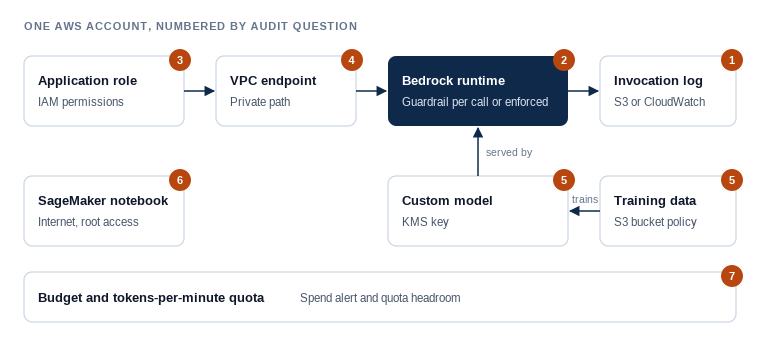
Source: Author's diagram. Check numbers refer to Exhibit 1.
When to run the scan
The AI audit runs as a separate command and is read-only: it changes nothing in the account. Each check can also run on its own, with the commands below as they stood in version 2.0.0.
pip install kosty==2.0.0
kosty ai audit --output console
kosty ai bedrock check-no-guardrails
kosty ai bedrock check-shadow-ai
I would run it in three situations: when a team first enables Bedrock or SageMaker in an account, on a schedule afterwards so that new roles and notebooks are caught, and before any review in which someone will ask whether AI workloads are governed. In each case the scan produces the list, and the review of what remains to verify, the right-hand column of Exhibit 1, is where the governance work happens.
The checks also need to follow the services. Bedrock’s enforced guardrails, generally available since April 2026, are one example of a control that the v2.0.0 guardrail check does not yet read.